The summary in 3 points:
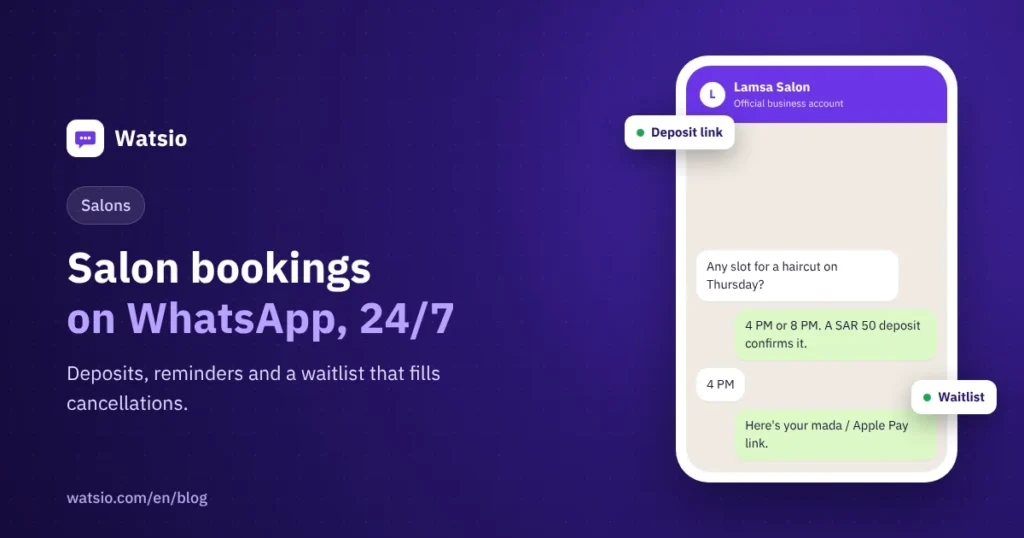
- A WhatsApp salon booking system lets clients book by themselves at any time: they choose the appointment, pay the deposit through a payment link, and get a confirmation message instantly.
- A reminder one day before and another two hours before costs about SAR 0.04 per message under Meta’s current tariff, and cancellations are offered to the waitlist.
- Bookings, deposits and the waitlist are available from the Lite plan at SAR 79 a month before VAT, with a 14-day free trial and no card.
“Clients book and then don’t show up, messages reach me after midnight, and I spend my time matching bank transfer screenshots with appointments.” We hear this often from salon and beauty center owners. The result is an empty chair, a stylist waiting, and another client who wanted that slot.
In this guide we explain how a WhatsApp salon booking system works step by step: from the first message to reminders and filling cancellations from the waitlist, with a clear cost example.
Where are your salon bookings getting lost?
A client who messages you is usually ready to book. The problem starts after her message, and it shows up in three situations:
- Late replies: A message at 11 pm goes unseen, and by morning the client has booked at another salon.
- No-shows and late cancellations: The client forgets the appointment or cancels shortly before, so the chair stays empty and the stylist’s time is wasted.
- Deposits by bank transfer: You ask for a deposit, get a screenshot, then search your bank statement to make sure the money actually arrived.
Each of these has a simple fix inside the chat itself, with no extra app for the client to download.
How does salon appointment booking on WhatsApp work?
Here is the client journey in a salon that uses the official WhatsApp Business Platform by Meta with an AI assistant:
- The request: The client types her request or sends a voice note, such as “I’d like a color and cut tomorrow afternoon.”
- Showing available slots: The assistant understands the request in her dialect and shows the available times for the service.
- Booking: The client picks a time, and the assistant adds the booking to your schedule, which can sync with Google Calendar.
- Deposit: The assistant sends a payment link inside the chat via Tap, PayTabs or Paymob, and the client pays with mada, Apple Pay or STC Pay.
- Confirmation: The client gets a message with the service, date, time and amount paid.
- Reminders: One message a full day (24 hours) before the appointment and another two hours before, with the option to confirm or cancel.
- Filling cancellations: If a client cancels, a message goes to people on the waitlist for that service so one of them can take the slot.
If the conversation needs a person, such as a specific question about a color or hair condition, the assistant hands it over to your staff member to continue.
Why is a deposit by payment link better than a bank transfer?
A bank transfer needs manual follow-up: you wait for the screenshot, check your account, then write the confirmation. With many bookings, matching gets delayed or lost.
A payment link, on the other hand, is sent inside the chat, and the client pays with a method she knows, such as mada, Apple Pay or STC Pay. Payment goes through your own account with the payment gateway, so the money reaches you directly.
We suggest stating your deposit policy clearly in the booking message: Is it deducted from the service price? How much notice is allowed for cancelling or rescheduling? Being clear from the start reduces disputes later.
How much do reminders and the waitlist cost?
Inbound messages from clients are always free of Meta fees. Reminders and waitlist notifications are Utility messages that cost about SAR 0.04 per message under Meta’s current tariff in Saudi Arabia. Pricing details are in the guide to WhatsApp API pricing in Saudi Arabia.
An example for a salon with 300 appointments a month and two reminders per appointment:
| Item | Calculation | Approximate monthly cost |
|---|---|---|
| Inbound client messages | No Meta fees | SAR 0 |
| Booking replies within the 24-hour window | Within the first 1,000 service replies per month per number | SAR 0 |
| Appointment reminders | 300 × 2 = 600 messages × 0.04 | SAR 24 |
| Waitlist notifications | 50 messages × 0.04 | SAR 2 |
| Approximate Meta fees | 24 + 2 | SAR 26 |
| Watsio Lite subscription | Monthly | SAR 79 before VAT |
You pay Meta fees to Meta directly, and Watsio adds zero margin. If you send a marketing offer to clients who agreed to receive it, a message costs about SAR 0.22, so about SAR 110 when sending to 500 clients. You can work out your own case with the WhatsApp cost calculator.
What should the reminder message say?
The reminder is sent with a Utility template that goes through Meta review before use, and we help you write it. Keep it short and clear, with only what the client needs:
- The salon name and the booked service.
- The date and time, and the location if you have more than one branch.
- A “Confirm attendance” button and a “Cancel or change appointment” button.
Example: “Reminder: your appointment is tomorrow, Thursday, at 4:30 pm for a color and cut. Tap Confirm, or choose Change if the time no longer suits you.” Do not add offers inside the reminder message, because offers are marketing messages with a different category and cost, and they need the client’s consent. Consent details are in the guide to the Personal Data Protection Law (PDPL) and WhatsApp.
Want the assistant to reply at night? What do you need to prepare?
The assistant replies to your clients in their Saudi dialect around the clock and learns from your website and files. But it needs clear information from you at the start:
- Your list of services, their prices and the approximate duration of each.
- Opening hours and closed days.
- The deposit amount and your cancellation and rescheduling policy.
- When to hand the conversation to a staff member, such as complaints or special requests.
You can try the assistant yourself by messaging “Fahd”, Watsio’s assistant, on WhatsApp: +966594005858. For details, read the guide to AI auto-reply on WhatsApp.
Note that the Lite plan includes 1,000 AI messages a month. If conversations grow, the Starter plan at SAR 199 before VAT includes 3,000 messages.
Can I use the salon’s current number?
Yes, but the number moves from the WhatsApp app to the platform and cannot work on both at the same time. Old chats stay on the phone. If you want to keep the app on that number, use a second salon number on the platform. The difference between the two is explained in the comparison of the WhatsApp Business app and the WhatsApp API.
How does Watsio help?
Watsio runs on the official WhatsApp Business Platform by Meta and brings booking, deposits, reminders and the waitlist into one conversation. These features are available from the Lite plan at SAR 79 a month before VAT, and voice replies are included on every plan, with monthly voice minutes by plan (from 200 on Lite to 6,000 on Professional). Your team replies from the Watsio dashboard in the browser, and the price is for the whole account, not per staff member. See Watsio for salons and beauty centers.
Related articles: The guide to WhatsApp message templates and WhatsApp for clinics and appointment reminders. You can also see Watsio plan prices and try it free for 14 days with no card.
Frequently asked questions
Does the client need an extra app to book?
No. The whole booking happens inside WhatsApp: the client types or sends a voice note, picks the appointment, and pays the deposit through a payment link inside the chat.
How much does an appointment reminder cost?
A reminder is a Utility message that costs about SAR 0.04 under Meta’s current tariff in Saudi Arabia. Two reminders for each of 300 appointments a month cost about SAR 24, paid to Meta directly with no margin from Watsio.
How does the waitlist work when someone cancels?
When a client cancels her appointment, a WhatsApp message goes to the clients who joined the waitlist for that service, so one of them takes the slot instead of the chair staying empty.
Which plan includes booking and deposits?
Bookings, deposits and the waitlist are available from the Lite plan at SAR 79 a month before VAT. You can try all features free for 14 days with no card.
Read next
- WhatsApp Link and QR Code for Your Business: wa.me Guide
- Prepare your WhatsApp AI assistant: data, instructions, testing
- WhatsApp Business calling: in-chat calls and what they cost
Sources
Last updated: November 2026 · Watsio team.